

Clash-free is not the same as erectable
A clash check looks at the finished model. I check the way in: every shipping piece is moved along the path a crane and an erector would actually use, against the real solids of everything already standing. Pieces that cannot get into place are found on the screen, not on the site.
Erectability check · IFC or native model
The piece that cannot go in
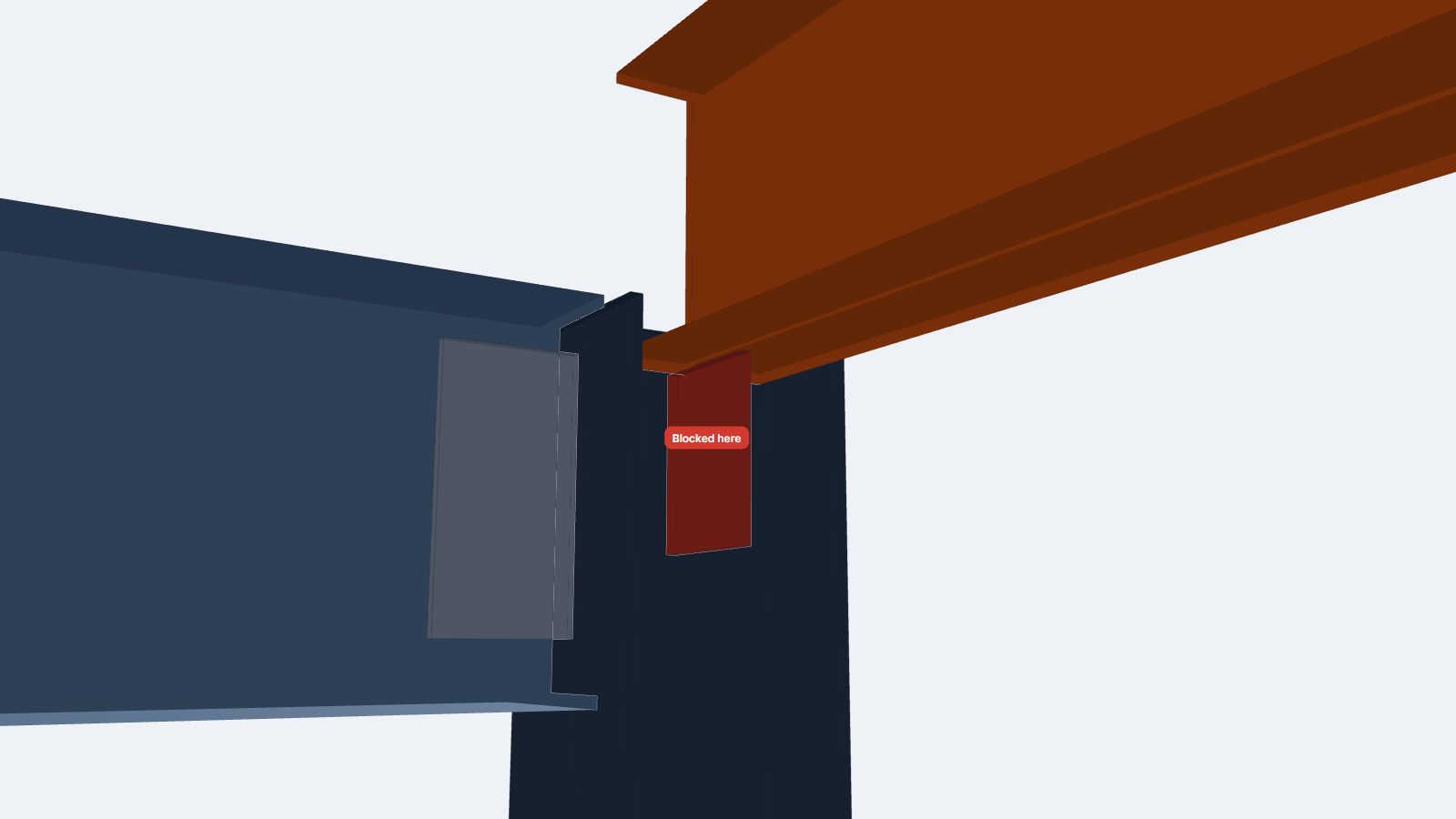
The sample is my own equipment platform, the same one behind the US shop drawing sample. A W10 side beam frames into the column web with a shear tab, and the beam end sits between the column flanges. Lowered from above, its bottom flange lands on the tab. To get around the tab the beam would have to step sideways first, and between the flanges there is only 18 mm of room.
Play both sequences
Switch between the sequence as drawn and the planned one. Step through each lift, rotate the model, and watch where a piece stops.
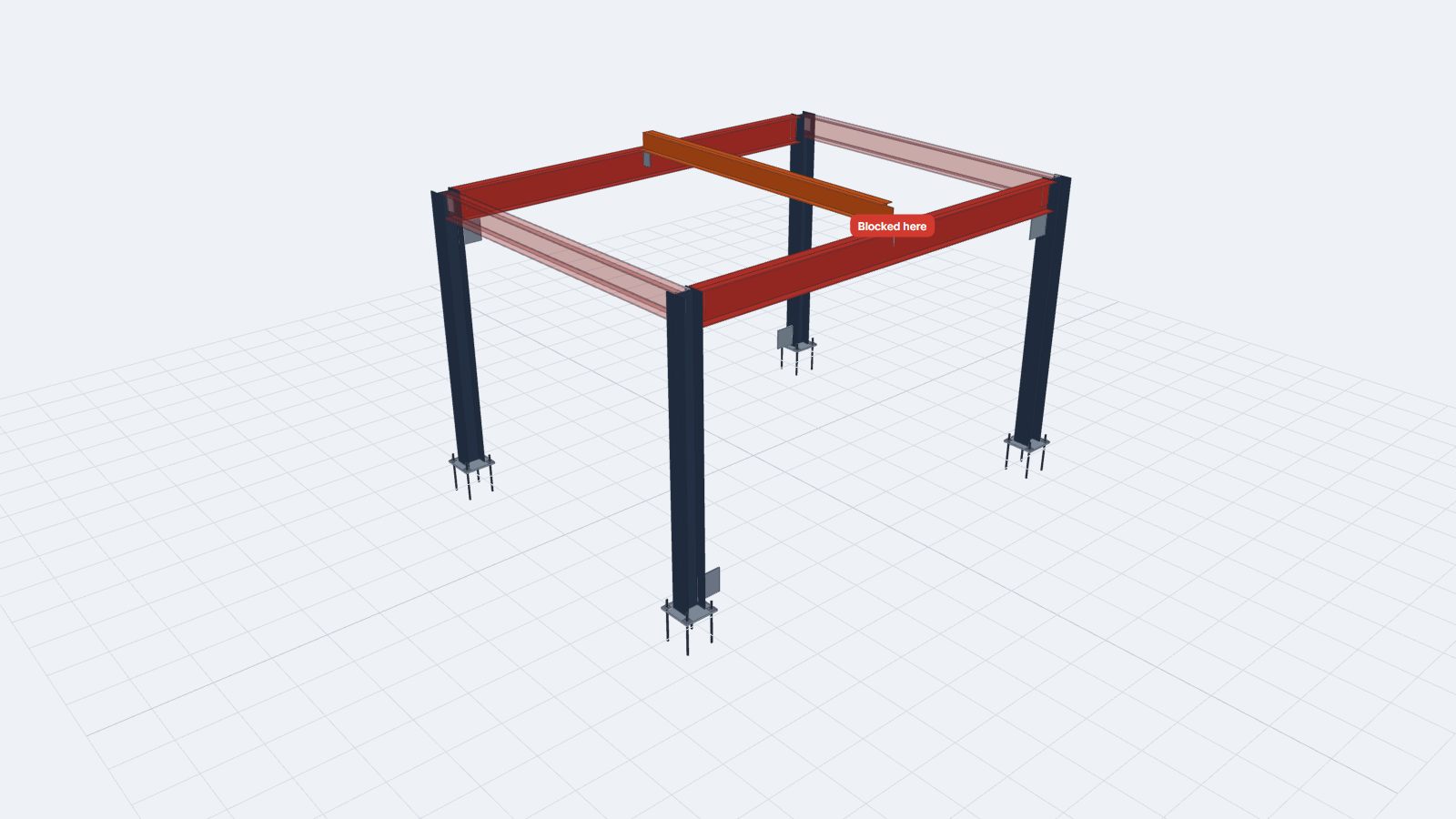
Shown on the poster: the infill beam stopped by the girder flanges (red). The two side beams that could not get in are left semi-transparent. Open full screen ↗
What the check found
Side beams into column webs
The shear tab is welded inside the flanges of the column. Lowered from above, the bottom flange lands on the tab. There is 13 to 18 mm of side room between the flanges, not enough to step around it.
Infill beam with a top cope only
The top flange is coped, but at both ends the bottom flange sits under the girder top flanges. It cannot be lowered past them, and the 0.5 inch end gap is too small to slide it in from one side.
Pre-assemble on the ground, then reorder
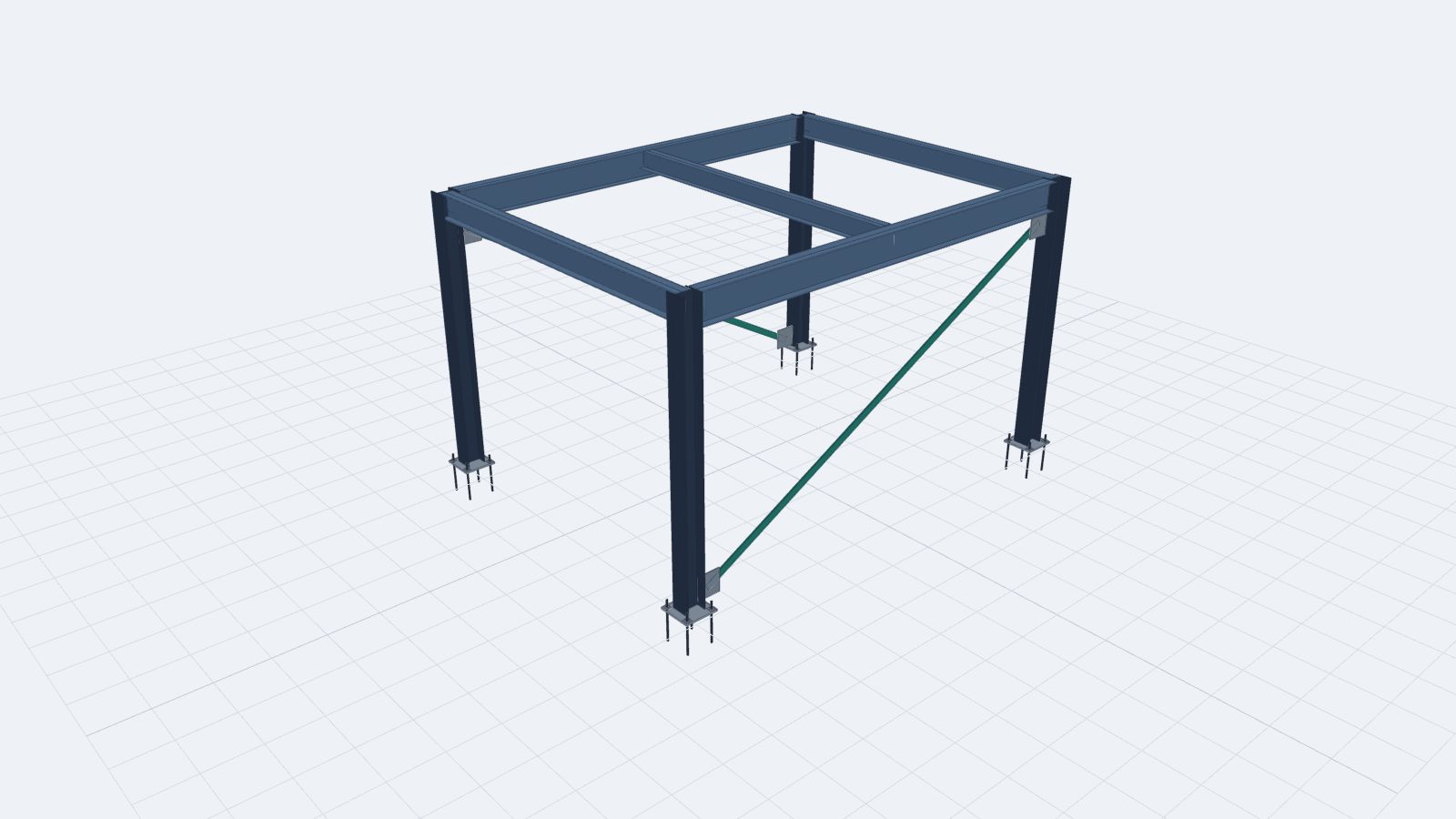
Two frames (column, side beam, column) are fitted on the ground by sliding the beam in along its axis. The girders and infill are fitted into one panel the same way. After the two frames, set the braces, then lower the panel 80 mm to the side and slide it onto the tabs. All 14 steps are clear.
The other fix is in the detail itself, for example an extended shear tab that keeps the beam end outside the column flanges, or a cope at the bottom flange. Which way to go is the fabricator’s and the engineer’s decision. The check shows the consequence of each choice before the steel is cut.
On this sample the note was chosen. It is now on erection drawing E1 as Revision 2 of the sample submittal: the two frames and the panel with their weights, the erection sequence, and temporary support by the erector per AISC 303-22 Section 7.10.3.
What I check
Your IFC or native model
I rebuild the real solid of every part: copes, fittings, plates and holes where they are exported. Welded fittings are grouped with the member they ship on. Connections that are bolted later stay loose, so they are not in the way.
Yours, or columns → beams → braces
Each lift goes in after what is already standing. Within a stage, members connecting to the standing frame go first. Give me your erection sequence and I check that one.
The moves an erector makes
Lowered straight down. Lowered beside the connection and slid on. Slid in horizontally. Tilted or swung in up to the angle you allow. Every crane lift carries its hook line, so a path that would drive the crane rope through the frame does not count as a way in. Pieces light enough to set by hand are placed without the crane.
Tilt, clearance, hand-set weight, pre-assembly
Set the tilt you accept (none, ±5°, ±15°) and an erection clearance in mm: the gap a piece must keep from everything it passes. Only the final move onto its own connection may touch. Set the weight up to which pieces go in by hand (45 kg by default), and whether ground pre-assembly is allowed. If it is, I propose the frames and panels that make the sequence work.
Free first look, full report on request
- Free: the number of blocked lifts in your model and the first three findings, each with a 3D view of where the piece stops and why.
- Full report: every blocked piece with its cause and two ways out (a sequence or pre-assembly change, or a detail change), the clear erection sequence, and a lift list with piece weights.
- Fixes in your model: if you want the detail changed, I make the change and run the check again until every lift is clear.
- An animation for your erector: the planned sequence as an interactive 3D page, like the one above.
Full work is quoted as a fixed price after the first look. Your model is used only for this check. It is never shown or published, and it is deleted when the job is closed. The check covers the geometry of the steel going together. Crane selection and temporary stability stay with your erection engineer.
Send a model
Attach an IFC (or a link to it) and tell me the options below. Leave anything blank and I use the defaults: columns → beams → braces, tilt up to ±15°, no extra clearance, pieces up to 45 kg set by hand, ground pre-assembly allowed.