

Tekla 2026 model to Tekla 2024
Your client, fabricator or partner office still works in Tekla Structures 2024, and Tekla does not save back to an older version. This tool rebuilds your 2026 model in 2024: parts, components, bolts, welds, cuts and assemblies. Then it checks every part, every bolt position and every weld against the original and gives you a report.
Free tool · BIM detailing
Why not IFC?
An IFC round trip gives you reference geometry, not a working model: components, bolt groups, welds and cuts are lost, and the detailer starts again. This tool works through the Tekla Open API instead, so the 2024 model is a native model you can number, change and draw.
Parametric where it is safe
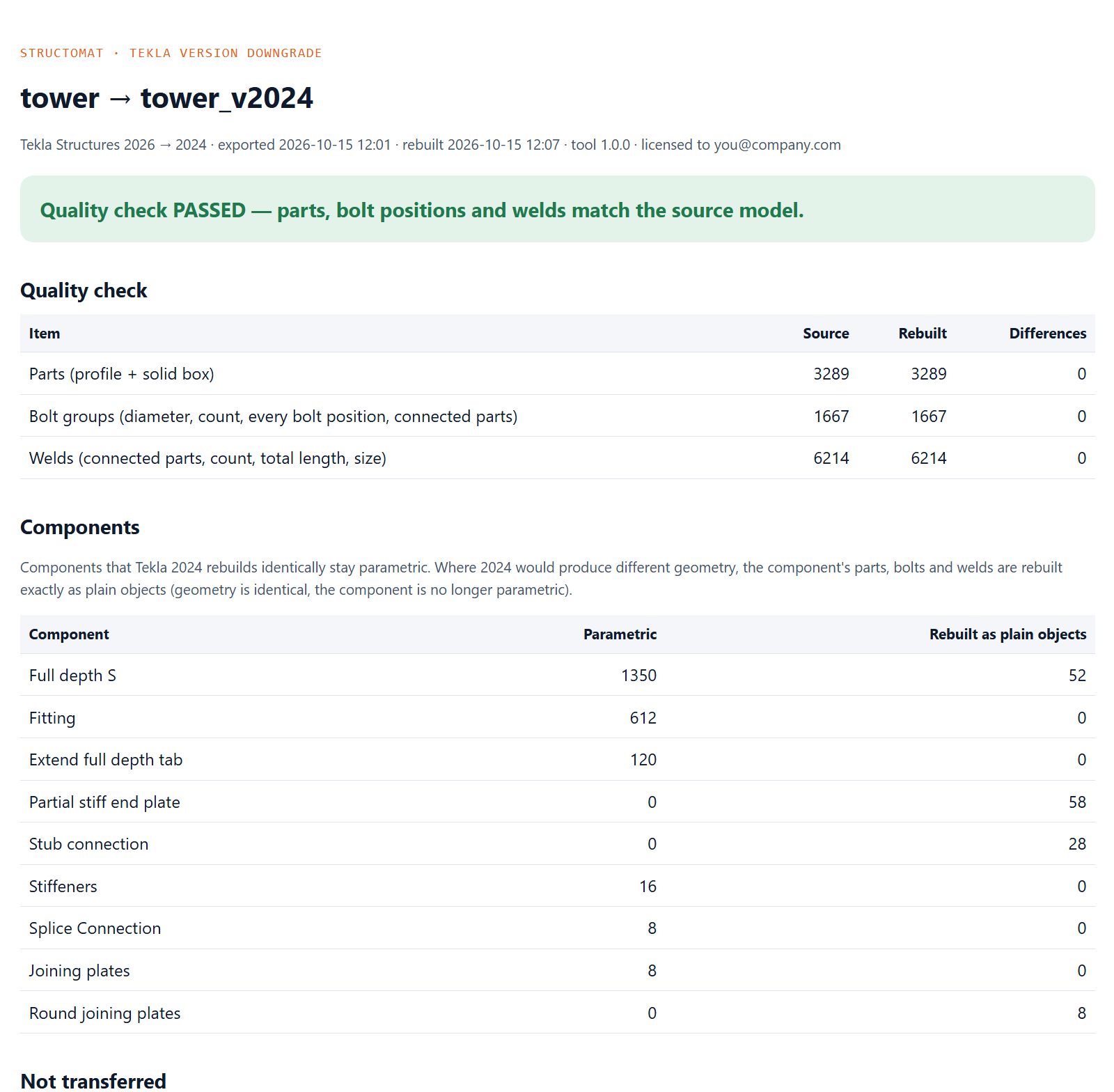
Each component is inserted in 2024 with the same attributes, then its parts, bolts and welds are compared with the source. If Tekla 2024 builds it differently, the component is rebuilt as plain parts, bolts and welds with the original geometry, and the report lists it.
Native objects
Beams, columns, contour plates, polybeams, cuts and fittings, bolt groups, welds including polygon welds, assemblies with their main parts, phases, grids and user-defined attributes.
Every object, not a sample
Parts by profile and solid box, bolt groups by every bolt position and the parts they connect, welds by connected parts, count, total length and size. Any difference is listed in the report.
Runs on your computer
The tool runs locally next to Tekla and needs no internet connection. The model is not uploaded anywhere.
A new model, never yours
The import always creates a new 2024 model next to the one you have open. Your open model is not changed.
Two computers or one
Export writes a single package file on the 2026 computer. Copy it to the 2024 computer, or use the same computer if both versions are installed.
How to use it
Install the license
You receive the tool and a license file by e-mail. Install the license once on each computer with one command.
Export in Tekla 2026
Open the model in Tekla Structures 2026 and double-click the 2026 program. A package file is written to your desktop.
Import in Tekla 2024
Start Tekla Structures 2024 with any model open and drag the package onto the 2024 program. A new model is created and rebuilt.
Read the report
The quality check report opens in your browser and is saved in the new model folder. Run numbering in Tekla 2024, then create your drawings.
Tested on real fabrication models
Before release the tool was run on four real fabrication models and on a 60-case test model cut from real projects, covering the components that appear most often. Every run below ended with zero differences.
| Model | Parts | Bolt groups | Welds | Differences |
|---|---|---|---|---|
| Elevator structure | 3,289 | 1,667 | 6,214 | 0 |
| Mezzanine floor | 1,270 | 506 | 1,285 | 0 |
| Steel canopy | 825 | 300 | 993 | 0 |
| Canopy set | 460 | 168 | 418 | 0 |
| Component test model | 60 cases | 0 | ||
Requirements
- Windows with Tekla Structures 2026 for the export and Tekla Structures 2024 for the import.
- .NET Framework 4.8 (included in current Windows 10 and 11).
- A free license file, valid for 90 days. Renewal is free; just ask again.
Not transferred
- Drawings, view settings and the personal view tree. Create drawings in 2024 after numbering.
- Numbering: run it in Tekla 2024.
- Properties that do not exist in Tekla 2024.
- Check the report before you use the model for fabrication, as with any conversion.
Need the drawings in 2024 too?
A downgraded model has no drawings. I can number the 2024 model and produce the general arrangement, assembly and part drawings, or check drawings your team has made, with a fabricator’s eye before they go to the shop.
See how a job is pricedGet the tool
The tool is free. Send me an e-mail with your name and company, and I will reply with the tool, a license file for your e-mail address and a short guide.
Request the tool Free to use, including on commercial projects; provided as is, without warranty. The license file carries your e-mail address. Your e-mail is used only to send you the tool and license and to answer your questions; it is not added to a mailing list. See Privacy.Tekla is a registered trademark of Trimble Solutions Corporation. This tool is made by Structomat and is not affiliated with or endorsed by Trimble. More free tools: structomat.com/tools.